Account safety
Why WhatsApp bans bulk senders, and how to stay under the line
Bans are not random. They follow a small number of signals you can measure and control — how fast you send, how similar your messages look, and how many people report you. Here is what those signals are, what you can set, and what to do if your number has already gone.
Windows 10/11 · free 24-hour trial
What actually gets an account flagged
WhatsApp does not publish its detection rules, and anyone who tells you they know the exact thresholds is guessing. What is well established is which behaviours the system reacts to.
Sending too fast
A person types. A script does not. Hundreds of messages leaving one account in a few minutes is the single clearest signal that the account is automated, and it is the easiest one to avoid.
Identical messages
The same text delivered to hundreds of people is trivially easy to cluster. Message uniqueness matters roughly as much as pacing does.
Being reported and blocked
This is the signal that matters most, because it comes from real people. A campaign to a cold, unconsented list will collect blocks no amount of pacing can offset.
Account age and history
A number registered last week sending its first thousand messages looks nothing like a two-year-old account doing the same. New accounts get far less benefit of the doubt.
No prior conversation
Messaging people who have never contacted you is the highest-risk shape of all. It is also the shape most bulk campaigns take, which is why the list matters more than the tool.
None of this is a formula. The thresholds move, they differ per account, and they are not published. Treat everything below as reducing risk, not removing it.
The limits you can set
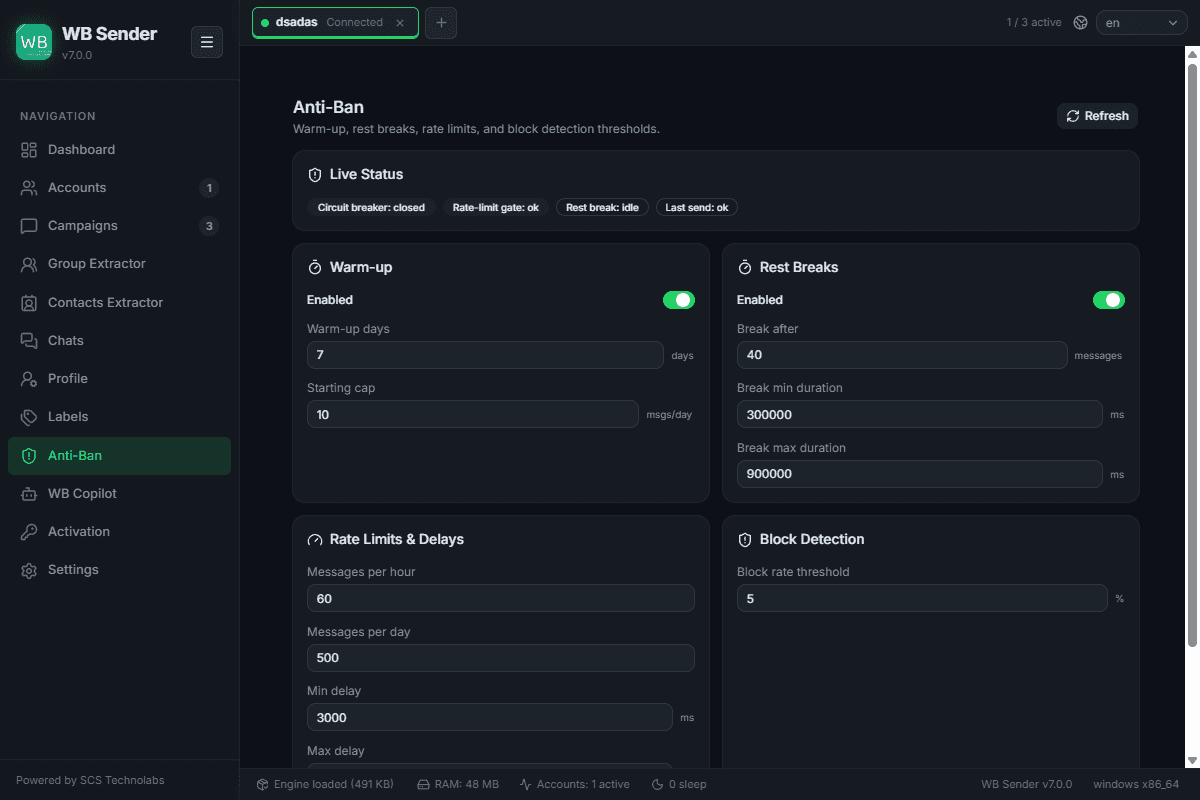
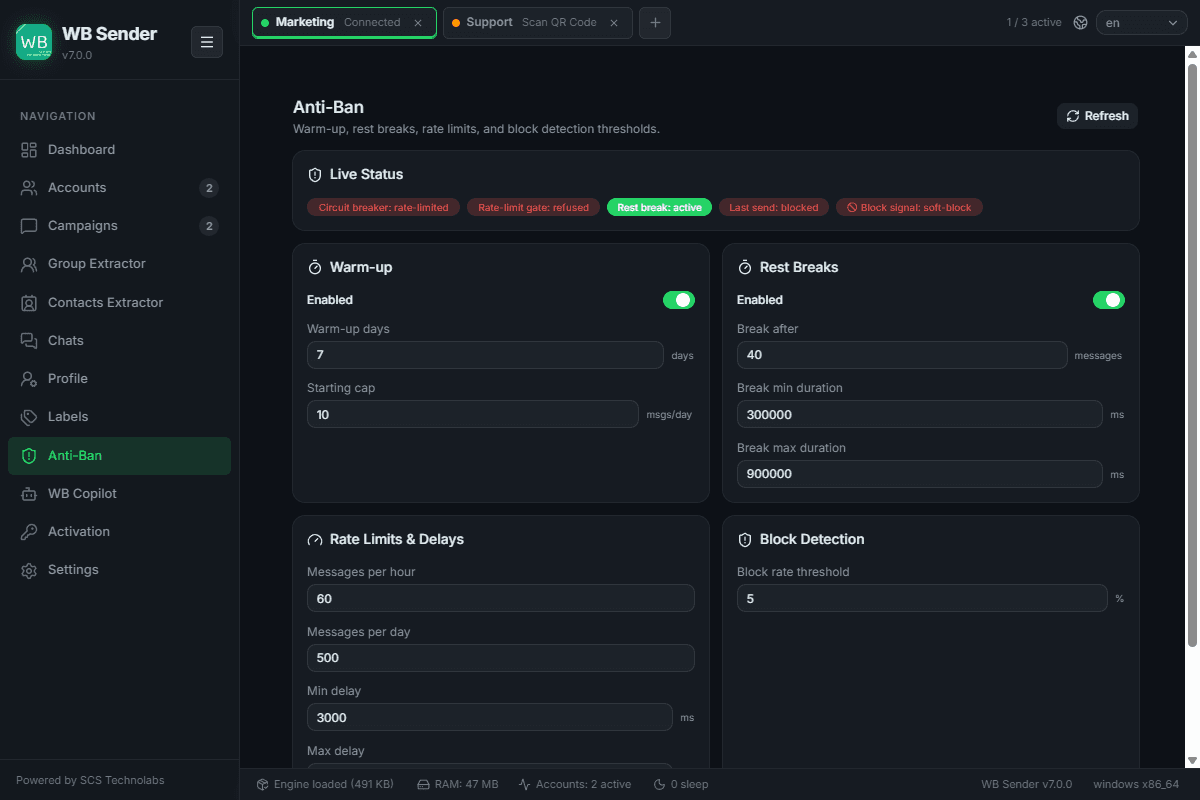
WB Sender AI paces campaigns for you, and every control below is yours to change. The figures are the app's documented example settings, not fixed ceilings.
Warm-up mode
New or long-idle accounts get flagged when they suddenly send at volume. Warm-up restricts the initial load and scales your daily allowance up over a period you choose, instead of sending everything on day one.
Randomised delays
Every send waits a different, randomised amount of time — around 3 to 12 seconds by default — so the gaps between your messages do not form a machine-readable pattern.
Hourly and daily ceilings
Cap how much leaves the account per hour and per day — for example 60 an hour and 500 a day. When a campaign reaches a ceiling it pauses itself and resumes when the cooldown expires.
Rest breaks
After a batch — say every 50 messages — the campaign stops for a set period, around 15 minutes, the way somebody putting their phone down would.
Block-rate circuit breaker
The app watches deliveries against blocks and failures while the campaign runs, and halts it the moment your failure rate crosses the threshold you set — before a bad list burns the number.
Typing-indicator simulation
The app can show the typing indicator before a message lands, so the conversation looks the way it would if you were writing it.
WB Sender AI only
The AI anti-ban engine
Fixed settings are a blunt instrument: you choose the numbers once, before you know how the campaign will go. The AI engine adjusts while it runs, on your own machine.
Adapts pacing in real time
Delays, batch sizes and ceilings move with live delivery, read and block signals during the run, instead of sitting at whatever you typed before it started.
Predicts risk before sending
It scores the campaign and the account up front — message content, list quality, account age, recent history — and warns or throttles you before the damage rather than after it.
Rewrites messages to reduce risk
Per-recipient variation that goes past fixed spintax, so no two people receive an identical message and the campaign has no single fingerprint.
Mimics human behaviour patterns
Typing indicators, read receipts, active hours and gaps between sessions, generated as a plausible pattern rather than a uniform send loop.
The model runs on your own computer, like the rest of WB Copilot. No API key, no per-message fee, and your chats never leave the machine.
This reduces the patterns that get accounts flagged. It cannot make an account unbannable, and nothing can — the decision is WhatsApp's and the rules are theirs to change. A bad list will still get you reported.
The limit you cannot set
WB Sender sends through your own WhatsApp account, exactly like the app on your phone — which means WhatsApp's own daily sending limit applies to it too. That cap is not published, it is not the same for everyone, and it moves with your account's age, its history and how people react to your messages. No bulk-sending tool can lift it, because the limit lives on WhatsApp's side, not ours. Anyone advertising an unlimited daily volume is describing something other than your own number.
For comparison, the Business API from Meta caps unverified accounts at 250 unique contacts a day before verification, then moves you through tiers gated on your quality rating.
When to move to the Business APIMake the messages different from each other
Pacing is only half of it. Spintax lets you write one message with alternatives at each phrase, and the AI can generate hundreds of contextually matching variations, so a campaign does not arrive as one identical block of text.
Spintax and AI variations in the manualIf your number is already banned
A ban is not always permanent, and the appeal path is WhatsApp's own — no third-party tool can reverse one.
- 1
Open WhatsApp on the banned number. If it is a temporary restriction, the app shows how long it lasts; wait it out rather than trying to work around it.
- 2
For a permanent ban, use Request a review inside the app, or contact WhatsApp Support from the account. Say what you use the number for, plainly.
- 3
While you wait, do not move the same list to a second number. Repeating the behaviour that got the first one banned is what turns one loss into two.
- 4
When you come back, treat the account as new: warm it up, cut the volume, and fix the list before the pacing.
We will not help you evade a ban. If an account was banned for messaging people who never asked to hear from you, the fix is the list, not a workaround.
Questions people ask first
How many WhatsApp messages can I send in a day without getting banned?
There is no published number, and any tool quoting you one is guessing. The limit moves with your account's age, its history and how recipients react. What you can control is the shape of the sending — pace it, vary the message, and send to people who expect to hear from you.
Does using a bulk sender get you banned by itself?
No. What gets accounts banned is the pattern: high volume from a new account, identical text, and recipients who report you. The tool determines how easy it is to avoid that pattern, not whether you are flagged for having one.
Is a WhatsApp Business account safer for bulk sending?
It is not inherently safer for cold outreach. It gives you a business profile and catalogue, but the same sending signals apply. The account type matters far less than the list and the pace.
Will warming up a number guarantee it stays safe?
No. Warm-up reduces the most obvious risk factor — a brand new account suddenly sending at volume — but it does not offset a cold list or a high report rate.
What is a safe delay between messages?
Longer and less regular is better than short and uniform. The app randomises each gap rather than using a fixed interval, because a constant delay is itself a pattern, and you can widen the range whenever you want.
Can I get a banned number back?
Sometimes. Temporary restrictions expire on their own, and permanent bans can be appealed through Request a review inside WhatsApp. It is their decision, and no software vendor can influence it.
Send at a pace your number survives
Warm-up, randomised delays, hourly and daily ceilings, rest breaks and a block-rate circuit breaker — plus an AI engine that adapts them while the campaign runs. All configurable, all on your own PC.